Prerequisites
Everything that must be gathered or reserved before starting an installation. Nothing on this
page replaces scripts/preflight.sh, which mechanically checks part of these prerequisites:
this page says what has to be gathered, the script says whether it actually is.
Hardware and hypervisor
The reference cluster runs on six virtual machines, on a hypervisor (VMware ESXi on the reference instance): three control-plane nodes, three worker nodes, Talos v1.13.
That number is a reference sizing, not a constraint of the guide: a customer may deploy more or
fewer. It is declared in the sheet by TV_NODE_COUNT, which
scripts/validate-install.sh compares against the number of nodes actually Ready
(Parameters).
- Talos extensions: the workers carry the
iscsi-toolsextension (kernel moduleiscsi_tcp), required by Longhorn for replicated block storage. It is not declared in the configuration: it is baked into the installer image by the Talos Image Factory (https://factory.talos.dev, ticksiderolabs/iscsi-tools), and the worker profile'sinstall.imagepoints at that schematic's installer. The same image serves the upgrades; a generic installer in its place would lose iSCSI at the firsttalosctl upgrade. - Disks: two disks per worker. The worker profile's
install.diskdesignates the system disk of the customer VM. The second one is dedicated to Longhorn:talos/patches/longhorn-disk.yamldeclares a user volume on it, formatted and mounted by Talos at/var/mnt/longhornwithout a reboot, which the worker profile exposes to the kubelet. Without a second disk, Longhorn lands on the ephemeral partition, shared with images and logs, and the free space of both becomes one. - StorageClass: the cluster must expose a default StorageClass well before the application
layer. It is Vault, laid down as early as the base layer, that claims one first: its three
pods stay
Pendingfor as long as it is missing, and the whole rest of the procedure waits with them.scripts/preflight.shchecks this in its control 7, but only when run without--skip-cluster, hence at step 4 of the Step by step and not before. The expected value is carried byTV_STORAGE_CLASSin the customer sheet. - Resources per node (CPU, RAM): this repository sets no validated minimum value. Until a reference sizing exists, ask the vendor for a recommendation before ordering the hardware, and record the actual consumption after the first deployment to refine subsequent orders.
Single point of failure on a single physical host
The redundancy of three control-plane plus three workers protects against a software failure or the reboot of a VM, not against the loss of the host, its power supply or its datastore: on a single server, that loss takes the cluster and the data layer away together. A separate data VM on that same host does not improve availability, it improves operability, which is a real but different gain. The only measure that removes this point of failure is a second physical host for the data VMs. Even before that placement choice, a backup that leaves this host comes first: this guide provides none.
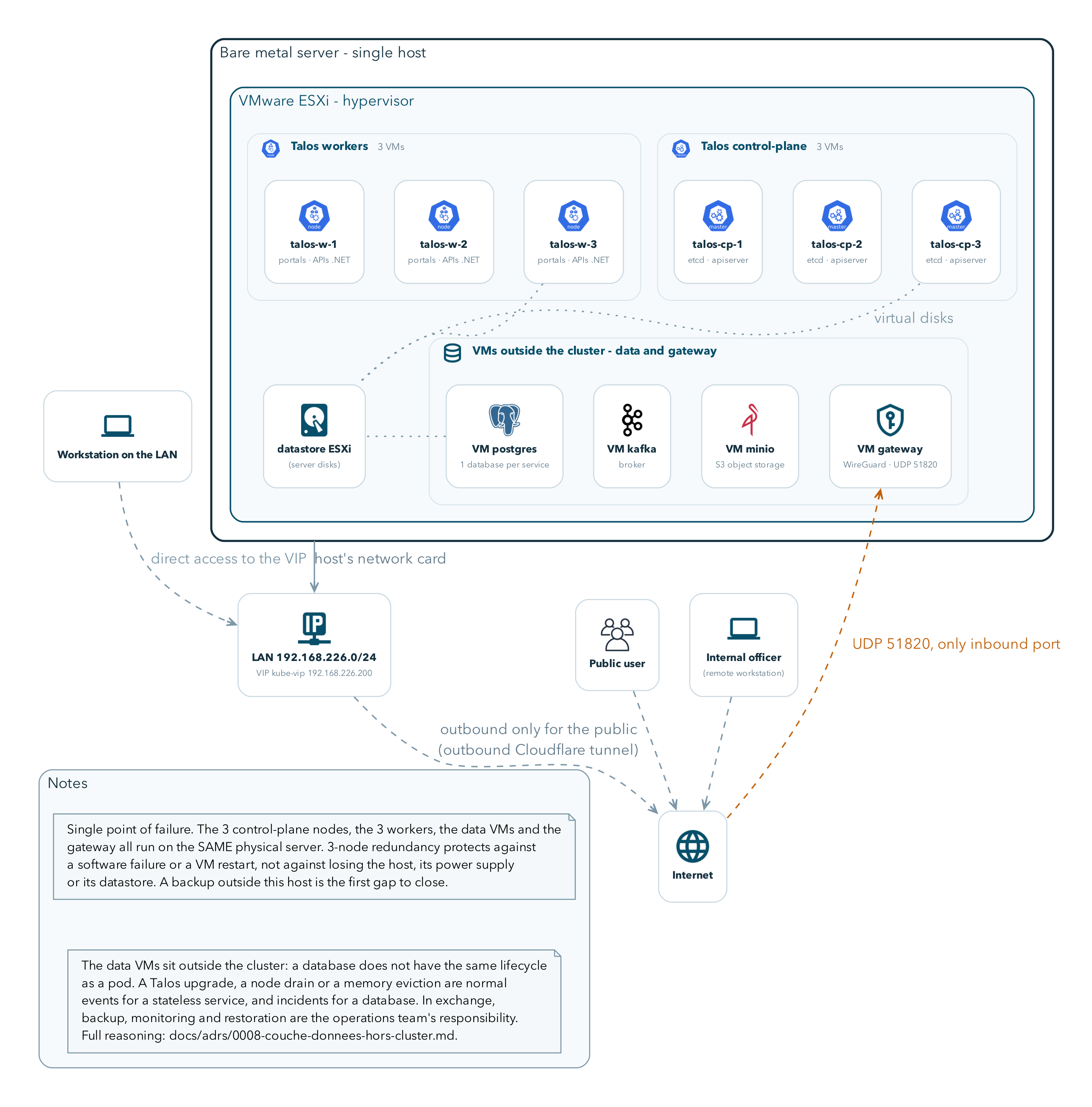
Everything this figure shows sits on a single physical machine. That is what to see in it: the six Talos VMs and the data VMs share the same server, the same power supply and the same datastore.
Addressing plan to reserve
Six addresses or ranges to reserve before starting, independent of the domain. The values
below are an illustrative example, in the same format as those of
scripts/install.env.example, never a value to copy as is.
| Variable | Role | Illustrative example |
|---|---|---|
${TV_CP_ENDPOINT} |
Talos control-plane endpoint, consumed by talosctl |
10.0.0.100 |
${TV_VIP} |
virtual address published by kube-vip, single entry point of the cluster | 10.0.0.200 |
${TV_VIP_RANGE} |
range managed by kube-vip, VIP included, at least ten contiguous addresses | 10.0.0.200-10.0.0.209 |
${TV_TRAEFIK_CLUSTERIP} |
fixed ClusterIP of the Traefik service, referenced by CoreDNS | 10.111.0.21 |
${TV_POD_SUBNET} |
pod subnet, consumed by talosctl |
10.244.0.0/16 |
${TV_SVC_SUBNET} |
service subnet, consumed by talosctl |
10.96.0.0/12 |
${TV_CP_ENDPOINT} lives in the Talos configuration and is out of reach of
scripts/render-config.sh: it is set when the machine configuration is generated, not by text
substitution. ${TV_POD_SUBNET} and ${TV_SVC_SUBNET} also live in that
configuration, but not only there: render-config.sh substitutes them as well in
core/vpn/peer-officer.template.conf, where the tunnel advertises those two ranges to the
agents. Changing them in Talos without carrying them over into the sheet lets the tunnel come
up, the agents connect, and nothing be reached behind it, with no error at all.
DNS zone and Cloudflare account
- A domain dedicated to the customer,
${TV_DOMAIN}, already delegated to Cloudflare before starting. - A Cloudflare account with access to that domain's zone, and its zone identifier,
${TV_CF_ZONE_ID}. - An API token scoped to that single zone, with two permissions and nothing more:
Zone:DNS:Edit, which writes the_acme-challengerecords of the DNS-01 challenge, andZone:Zone:Read, which control 5 ofscripts/preflight.shrequires because it queriesGET /zones/${TV_CF_ZONE_ID}. That is the tokenscripts/preflight.shchecks through the environment variableCF_API_TOKEN. A token limited toZone:DNS:Editmakes that control return aKO zone <id> : HTTP 403: the message names the incomplete scope as the first cause, then the zone and revocation, and gives the/user/tokens/verifyrequest separating them.
Certificate issuance uses the DNS-01 challenge rather than HTTP-01: HTTP-01 forbids wildcards and would require publicly exposing every host, the opposite of this platform's exposure model.
Three prerequisite-level constraints follow from this, to be validated before starting:
- The cluster's internal DNS resolution rewrites every
*.${TV_DOMAIN},_acme-challengeincluded. The propagation check that cert-manager runs before requesting validation can therefore never succeed if it goes through the cluster resolver. - cert-manager must consequently run with
--dns01-recursive-nameservers-onlyand--dns01-recursive-nameservers=1.1.1.1:53,8.8.8.8:53, which assumes the nodes can reach those two resolvers outbound on port 53. That is a network opening to have validated with the customer, on the same footing as the addressing plan. - This setting does not live in cert-manager's upstream manifests: any reinstallation or update that reapplies its Deployment silently erases it, and the failure only shows up at the next renewal, up to sixty days later.
.app domain and HSTS preload: no workaround possible
If ${TV_DOMAIN} ends in .app, the domain is on the browsers' HSTS preload list.
Until the wildcard certificate is issued and Ready, no host of the
platform is reachable, and the browser offers no way to get past it: the
"proceed anyway" button does not exist on this kind of domain. Check before
starting that the Cloudflare zone really is delegated for this domain.
External data layer
The customer sheet declares six external data endpoints, and scripts/preflight.sh refuses
to pass for as long as they do not answer: this is a constraint of this guide's scripts, to be
provisioned and made reachable from the cluster before the installation.
Actual state of the repository, which the operator provisioning these six services must know.
Kafka, Redis and Elasticsearch are deployed inside the cluster by the repository's base layer
(data/kafka.yaml, data/redis.yaml, data/elasticsearch.yaml), not outside the cluster, and no
service connects to the last two: those two endpoints today provide no
function. They must nonetheless be provisioned, because preflight.sh tests them like the four
others and refuses to pass if one of them does not answer. Providing them is therefore mandatory in
order to install, without being useful at runtime.
A seventh endpoint, absent from this list as it is from the customer sheet, is by contrast
indispensable: Keycloak's database. No manifest in this repository deploys it.
apps/keycloak/keycloak.yaml hard-codes
jdbc:postgresql://keycloak-db-rw:5432/app, and no manifest creates the Service
keycloak-db-rw. A Postgres database reachable under that exact name and that port is
therefore to be provisioned like the six others, without any variable of the sheet or any control of
preflight.sh claiming it or checking it. The detail is at step 11 of the
Step by step.
| Variable | Used for | Symptom if wrong |
|---|---|---|
${TV_PG_HOST} |
application Postgres | .NET pods restarting in a loop, with no explicit message on the Kubernetes side |
${TV_KAFKA_BOOTSTRAP} |
not consumed: Kafka is deployed inside the cluster by the base layer | no effect, variable required by preflight.sh |
${TV_REDIS_HOST} |
not consumed: no service connects to it, and a Redis is already deployed inside the cluster by the base layer | no effect, variable required by preflight.sh |
${TV_ES_HOST} |
not consumed: no service connects to it, and an Elasticsearch is already deployed inside the cluster by the base layer | no effect, variable required by preflight.sh |
${TV_MINIO_ENDPOINT} |
object storage for the content-service media | broken images with a 403 |
${TV_SMTP_HOST} |
the customer's real SMTP | no mail leaves the platform, with no error on the application side |
scripts/preflight.sh checks a TCP open (nc -z) on each of these six endpoints:
that proves the port answers, not that the credentials are right nor that the expected database
or index exists.
Two operational constraints to settle at provisioning time, not afterwards: never put
the MinIO data and the PGDATA on the same virtual disk, on separate datastores if
the host allows it; backups, monitoring and restore of the data VMs are
the operator's responsibility, this guide provides none.
These values are written into Vault during the step-by-step installation, not into the manifests.
Operator workstation tooling
Checked mechanically by scripts/preflight.sh, section "outils du poste".
| Tool | Used for |
|---|---|
kubectl |
driving the cluster once bootstrapped |
kustomize |
building or validating the base layer locally (kustomize build .), in addition to kubectl's own kustomize integration |
talosctl |
generating the machine configuration, bootstrapping the cluster; to be matched to the installed Talos version |
curl |
checking the Cloudflare token, one-off API calls |
sed, grep |
used by render-config.sh and by the guide's scripts |
nc |
checking the reachability of the data layer (section "8. couche de donnees" of preflight.sh) |
dig |
checking that internal hosts are not resolved publicly, the only automatic safeguard of the public/internal separation (control 8 of scripts/validate-install.sh) |
jq |
listing the keys of a Vault path without displaying the values (page Configuration) |
This repository sets no minimum version for these tools beyond their compatibility with
Talos v1.13 and the Kubernetes version of the target cluster: match talosctl and
kubectl to those two versions before starting, for lack of another validated reference point.
Accounts and accesses to obtain before starting
- Hypervisor (or physical) access to the target hardware, sufficient to create the six virtual machines.
talosctlaccess: the ability to generate a set of Talos secrets specific to this instance (never reusing secrets from another instance).- A Cloudflare account on
${TV_DOMAIN}, with the token and the zone identifier from the previous paragraph. - Network access and credentials to each of the six services of the external data layer.
- Access to the
trade.infrarepository to clone the guide and the scripts. - Outbound HTTPS on port 443, from the operator workstation and from the six nodes, to
github.com,charts.longhorn.io,charts.external-secrets.io, the${TV_REGISTRY}registry and the public registries of the upstream images (Talos, Calico, Traefik, Vault, kube-vip, cert-manager, metrics-server, Longhorn). No control ofpreflight.shtests that egress: on a filtered network, the gap only shows up at step 3 of the Step by step, "Lay down the base layer", as pods stuck inImagePullBackOff, that is to say during the intervention window. That opening is validated with the customer on the same footing as outbound port 53 and as the addressing plan.
Verify
Every command of this guide, those of this page as well as those of the following ones, runs
from the root of a clone of the trade.infra repository. That clone is not in the
archive: it is obtained from the vendor, who provides the repository URL, read access
and the reference this guide describes
(Overview).
git clone <repository-url-provided-by-the-vendor> trade.infra
cd trade.infra
git checkout <reference-provided-by-the-vendor>
git rev-parse --short HEAD
The last line prints the reference actually obtained: it must be the one the vendor handed over with this archive. If it differs, stop here and ask for the version of the guide that matches: the counts the following pages assert about the repository only hold for the reference described. The current directory stays that root until the end of the installation.
The sheet is filled in on page 03: this copy only provides a file for the next
command to read. As long as the sheet is not filled in, ${TV_DOMAIN} stays exemple.tld
and control 3 rejects it, which is expected at this stage.
The cluster does not exist yet: run preflight.sh with --skip-cluster. That flag skips
the two sections that require a cluster, and those only: cluster reachability (6) and the
default StorageClass (7). Control 8, the reachability of the six endpoints of the data
layer, runs in both cases: its nc -z calls go from the workstation to endpoints external to the
cluster, and it is precisely before the installation that this answer matters most.
Expected, once the sheet is filled in (page 03): PREFLIGHT : tous les controles passent. That
line does cover the six data endpoints: the six ok lines of control 8 are in the
output, and six KO lines would be there just as much.
If a line shows KO, the corresponding control has failed. Among the controls run at
this stage, every KO line blocks the installation: it is not worked around, it is fixed
before going any further. Once the cluster is bootstrapped (page 06), run the same command again without
--skip-cluster: it adds the two sections that require the cluster, reachability and the
default StorageClass.